The Signia StreamLine Mic is an advanced microphone that makes your Signia hearing aids hear more clearly than ever before.
If you’re someone who needs to hear speech clearly—even when you’re far from the speaker or in a noisy environment—StreamLine Mic is the answer. This compact device will completely transform the way you communicate, as it sends sound from a remote microphone directly to your Signia hearing aids. You’ll hear every word with clarity, even when the speaker is several meters away.
What is StreamLine Mic?
Signia StreamLine Mic is an accessory for Signia hearing aids that enhances hearing performance and connectivity with other devices. It functions as a remote microphone, a headset for mobile phones, and a wireless audio receiver. It can stream high-quality audio directly to your hearing aids from Bluetooth-enabled devices such as mobile phones, computers, and smart assistants like Alexa, Siri, and Google Assistant.
Additionally, StreamLine Mic allows you to take phone calls hands-free without needing to pick up your phone, and it can be used as a remote microphone to help you hear speech clearly in noisy environments such as meetings or restaurants.
If you’re someone who needs to hear speech clearly even when you are far from the speaker or in a noisy environment, the StreamLine Mic is the answer. This small device will completely transform the way you communicate, as it sends sound from a remote microphone directly to your Signia hearing aids, allowing you to hear every word clearly—even when the speaker is several meters away.
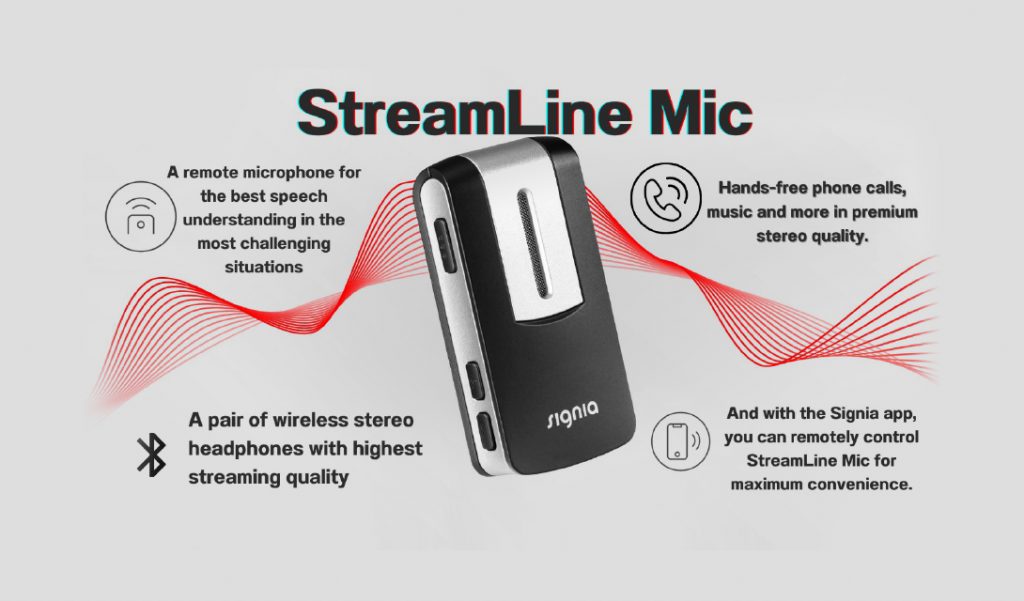
Hands-free calling, music, and more.
With premium sound quality,
you can answer phone calls without taking your phone out of your pocket, and you can even make calls using voice commands!
While streaming audio from the TV to your hearing aids through the StreamLine TV device,
you can instantly answer phone calls without manually turning off the TV sound.
In addition, you can stream phone call audio to both hearing aids (if you use two), which enhances the clarity and quality of your conversations.
A pair of wireless stereo earbuds with the highest streaming quality.
This is the perfect solution for those who want to stream phone calls, music, audiobooks, and more directly to their hearing aids from any Bluetooth-enabled device, including control through voice commands!
A remote microphone for the clearest speech understanding even in challenging situations.
The StreamLine Mic can also be used as a remote microphone to help you hear more clearly in high-noise environments, such as crowded meetings. You can stream the speaker’s voice directly to your hearing aids from a distance of up to 20 meters, allowing you to hear them as clearly as if they were standing right beside you.
With the Signia App, you can control your StreamLine Mic.
remotely with maximum convenience.
What are the special features of the StreamLine Mic?
How to use the StreamLine Mic.
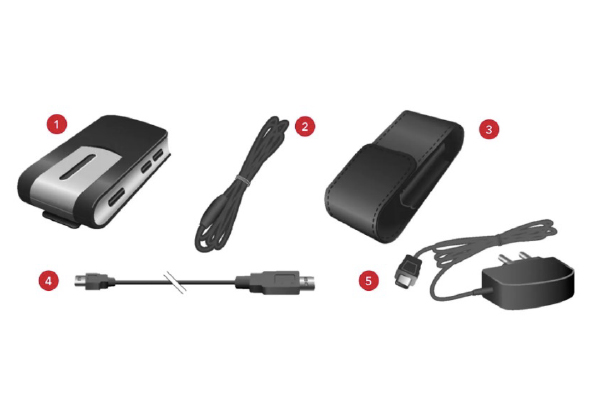
1. StreamLine Mic 2. Neck strap (various lengths) 3. Pouch 4. USB charging cable 5. USB charging cable and adapter
Special Features
Automatic pairing with hearing aids
Wireless stereo-quality audio streaming, including music
Hands-free calling
Remote microphone function allows you to hear the speaker clearly in noisy environments from up to 20 meters away
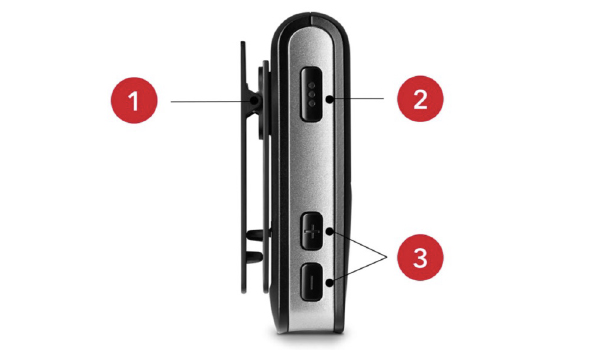
Control Button
1. Rotatable clip 2. Multifunction button 3. Volume control buttons and program switch
Full automatic pairing
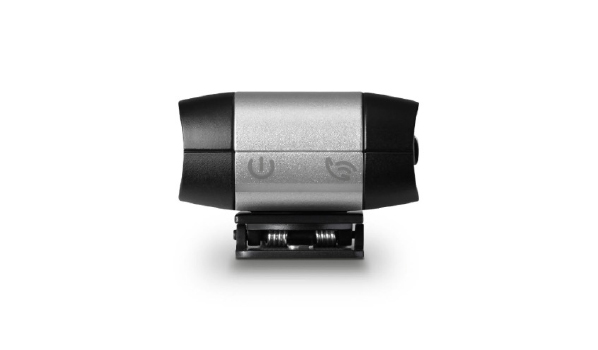
Pair the StreamLine Mic with your hearing aids in 3 easy steps: • Turn the StreamLine Mic off and on • Turn your hearing aids off and on • Place both hearing aids next to the StreamLine Mic (maximum distance: 20 cm)
The pairing process will start automatically, with the indicator light flashing yellow. When pairing is complete, the status display will turn solid yellow.
Pair the StreamLine Mic with your Bluetooth device (e.g., smartphone) in 3 easy steps:
Ensure that Bluetooth on your device is turned on (via the “Settings” menu) Press the StreamLine Mic’s multifunction button and the “+” button together for about 6 seconds. The status display will begin flashing blue (you now have 3 minutes to complete the pairing) Select “StreamLine Mic” in your device’s Bluetooth menu (if a PIN is requested, enter “0000”). When pairing is complete, the status display will turn solid blue
Pairing only needs to be done once. After that, pairing will activate automatically whenever the hearing aids, StreamLine Mic, and the Bluetooth device are turned on.
Technical requirements:
Bluetooth FW version 4.2 or higher
User-friendly LED display
The user-friendly LED display provides an overview of connected devices, functions, and the StreamLine Mic’s battery status.
StreamLine Mic Power Indicator Lights
Flashing orange light: The StreamLine Mic is charging while turned off.
Orange light: Charging is complete and the StreamLine Mic remains turned off.
Flashing green light: The StreamLine Mic is charging while turned on.
Green light: The StreamLine Mic is turned on and not charging.
Dim green light: Charging is complete and the StreamLine Mic is turned on.
Red light: Low battery.
Flashing yellow light: Searching for hearing aids.
Yellow light: The StreamLine Mic is connected to the hearing aids but cannot connect to other devices (e.g., a smartphone).
Flashing green light: Incoming call.
Green light: In an active phone call.
Flashing blue light: The StreamLine Mic is ready to connect to a Bluetooth device (e.g., a smartphone).
Blue light: The StreamLine Mic is connected to a Bluetooth device (e.g., a smartphone).
กะพริบเป็นสีแดงอมม่วง: มีโหมดไมโครโฟนระยะไกล
Purple-red light: The remote microphone is active.
Amber light: Streaming audio in progress (e.g., music).
STREAMLINE TV not only helps you hear the TV more clearly, but also enhances your overall quality of life. It is the perfect solution for Signia hearing aid users who want to enjoy TV to the fullest without disturbing those around them. If you’re ready, start transforming the way you watch TV today! Contact us at a branch near you.
Guidance provided by specialized experts.
Call 02-115-0568 to book an appointment.
Expert consultation services are available to help reduce risky behaviors that may lead to hearing loss and provide guidance on proper ear canal care. If you are interested in a hearing test or hearing aids, feel free to contact Digibionic. We are ready to assist you at all branches.