What should I do
if I'm wearing hearing aids
in a place with a lot of echo?

Have you ever felt that even while wearing hearing aids, sounds are still unclear or seem “echoey,” as if you were in a cave—especially in places like churches, conference rooms, or restaurants with high ceilings and smooth walls? This issue may be caused by “reverberation,” which can make it difficult for hearing aids to accurately pick up speech, resulting in confusing and unnatural sound.

So what should you do? Let’s take a look at some simple techniques that can help you hear more clearly, even in places with a lot of reverberation.

  1. Adjust the listening program to suit the environment

    Modern hearing aids, such as the Signia AX Series, offer multiple listening programs to choose from, such as
    “Speech in Noise” or “Hall” modes, which are specially designed to optimize sound processing for reverberant environments.

    Turn off features that may amplify reverberation

    In some cases, hearing aids may be set to amplify all surrounding sounds, which can make echoes overly noticeable.
    Try adjusting the settings to focus on “speech in front” or consult a specialist to turn off or reduce certain features, such as the “Omnidirectional Microphone.”

    Use new features such as Auto EchoShield

    If you are using a newer hearing aid model like the Signia 7AX, be sure to activate the Auto EchoShield feature.
    This feature is specifically designed to reduce reverberation by automatically detecting and lowering reflected sounds from walls or other hard surfaces, helping speech sound clearer.

Auto EchoShield by Signia AX

Auto EchoShield in Signia Augmented Xperience (AX) hearing aids is designed to manage situations where the wearer is in rooms with sound reflections from various surfaces, such as churches or entrance halls. These reflections are caused by multiple sound reflections within the room. One common issue hearing aid users experience in reverberant environments is that traditional hearing aids may amplify reflected sounds too much, making echoes more prominent than direct sound. This can result in sound that feels hollow, blurred, or lacking clarity.

Traditional hearing aid compression strategies often unintentionally amplify softer reflected sounds more than louder direct sounds, which leads to this problem. In mildly reverberant rooms, preserving the natural acoustics of the space by carefully controlling the amplification of soft sounds generally produces better results. However, in environments with stronger reverberation, reducing some of the dominant reflected sounds helps users hear the primary sound more clearly.

Previously, sound processing in environments with varying levels of reverberation required careful manual balancing. Signia has now effectively addressed this challenge with EchoShield, which is available in a dedicated program for reverberant environments. The new Auto EchoShield can analyze reverberation levels in real time in every situation and automatically adjust sound processing accordingly. This allows users to focus on what they want to hear without worrying about their hearing.

Auto EchoShield Analysis

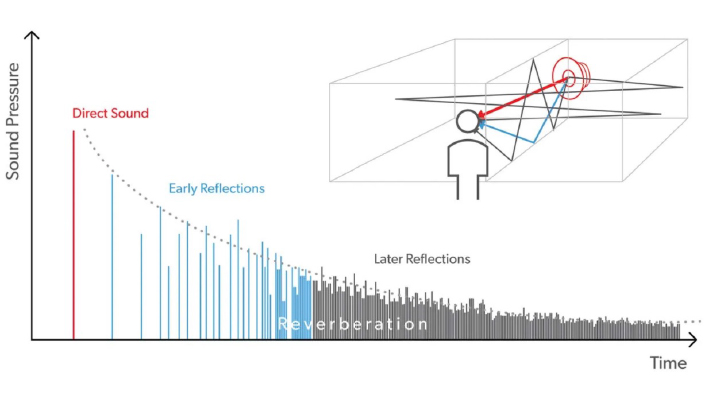
In addition to the direct sound that reaches the listener first from the sound source, most rooms also produce reflected sounds that arrive later. These reflections can be divided into two types: “early reflections” and “late reflections.”

This situation is illustrated in Figure 1, which shows the paths of different types of sound traveling from the sound source to the listener. In addition to the direct sound (shown in red), there are early reflections (shown in blue) and late reflections (which may result from multiple reflections off various surfaces) that also reach the listener.

Figure 1 illustrates a simulation of direct sound, early reflections, and late reflections when an impulse sound is delivered to a listener in a reverberant room.

When the sound being heard is speech, direct sound and early reflections help improve speech understanding.
However, late reflections can be detrimental if they are loud enough to cause temporal smearing and spectral smearing, which distort speech.

The more reverberant a room is—measured by the reverberation time (T60)—the more prominent the late reflections become, and the greater the risk of reduced speech intelligibility. Reverberation-related issues can affect all listeners, regardless of whether they have hearing loss. However, for hearing aid users, the problem can be more severe because modern hearing aids often use non-linear gain, which tends to amplify softer sounds more than louder ones. As a result, weak late reflections may be over-amplified, creating additional difficulties when listening to speech in reverberant environments.

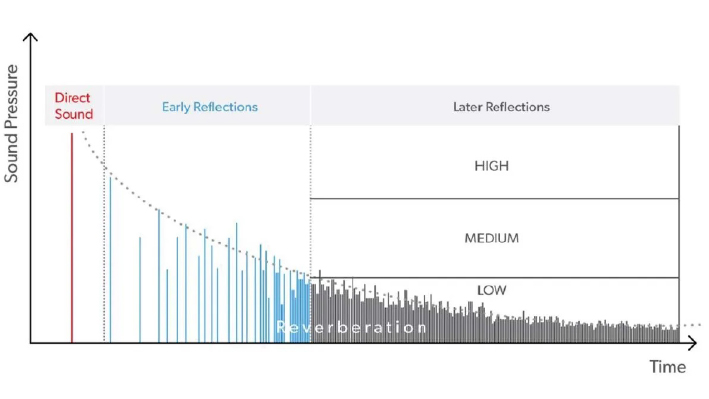
To address this issue, Signia AX hearing aids continuously measure information related to a room’s reverberation characteristics from the incoming audio signal. The Auto EchoShield Analysis system can accurately distinguish between direct sound, early reflections, and late reflections in different rooms within just a few seconds.

This analysis also estimates the amount of late reflections that may interfere with listening and sends this information to the Auto EchoShield processing module (see Figure 2).

Figure 2: Separation of direct sound, early reflections, and late reflections

Auto EchoShield Processing

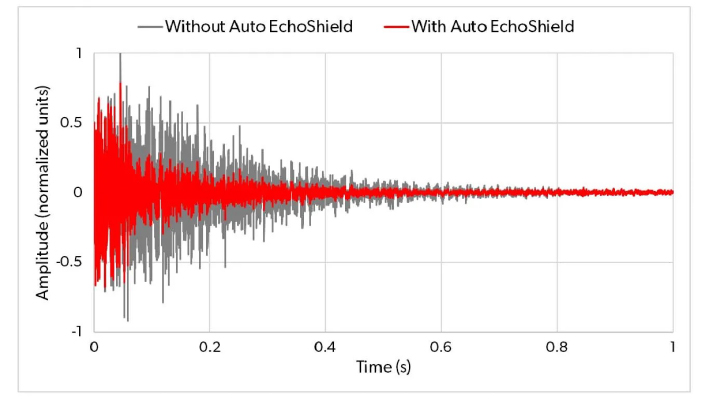
After the initial analysis, the Auto EchoShield system selectively amplifies only the direct sound and early reflections, as these two sound components are crucial for speech understanding in both normal-hearing listeners and those with hearing loss. This is illustrated in Figure 3, which shows the effect of activating Auto EchoShield in a reverberant room. When a short impulse sound is played in such an environment, the graph compares the hearing aid’s acoustic output with Auto EchoShield turned on and off as a function of time. It is clearly visible that early reflections occurring within approximately the first 50 milliseconds of the signal are preserved, while late reflections are significantly reduced by Auto EchoShield.

In the case of speech signals, this reduction of late reflections helps minimize interference with subsequent speech sounds, resulting in clearer speech perception and easier understanding, without losing the sense of room ambience, which is still conveyed through the preserved early reflections.

Figure 3 shows an impulse sound recording made at the ear of a KEMAR manikin fitted with a Signia AX hearing aid.
The gray signal represents the recording with Auto EchoShield turned off, while the red signal represents the recording with Auto EchoShield activated.

Evidence Supporting Auto EchoShield

The perceptual impact of Auto EchoShield was studied at Hörzentrum Oldenburg with 26 participants who had mild to moderate hearing loss. Participants listened to speech recordings made in a reverberant church environment and compared Signia AX hearing aids with Auto EchoShield activated against conventional hearing aids (configured with fast compression and using the NAL-NL2 fitting formula), as well as hearing aids from another leading brand (Brand A).

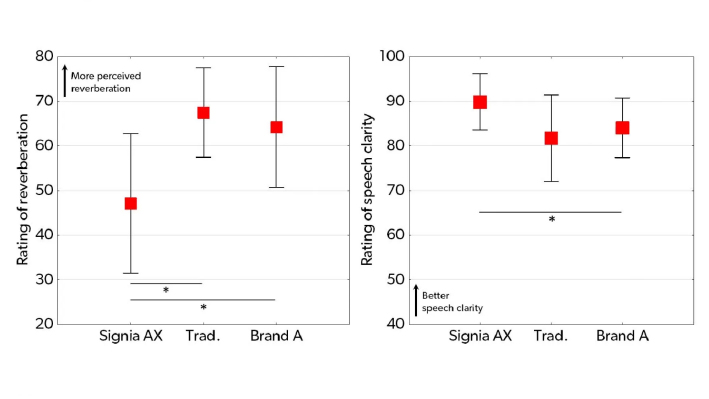
Participants rated the perceived level of reverberation and speech clarity using a scale from 0 to 100, as shown in Figure 4. The results demonstrate that Signia AX received lower reverberation ratings (indicating better performance) and higher speech clarity ratings (also indicating better performance) compared with both reference hearing aids.

These results clearly demonstrate the effectiveness of Auto EchoShield in reducing the impact of reverberation and significantly improving speech clarity.

Figure 4 Mean ratings of perceived reverberation (left graph) and speech clarity (right graph) for the three hearing aid conditions (Signia AX, conventional processing, and Brand A). Vertical bars indicate the 95% confidence intervals. Asterisks (*) indicate statistically significant differences (p < .05).

In the same study, 17 participants were fitted with Signia AX hearing aids featuring two programs within the same device. The first program used the full AX functionality (including Auto EchoShield), while the second program used conventional processing identical to that applied in the laboratory tests.

In real-life reverberant situations (such as building lobbies), participants were asked to switch between the two programs and rate the differences in six sound attributes using a scale from −5 (Program A much better) to +5 (Program B much better).

The mean ratings for each attribute are shown in Figure 5, demonstrating statistically significant benefits of using Signia AX with Auto EchoShield across all six attributes. In addition to confirming the laboratory findings that Auto EchoShield improves speech clarity, participants also reported clearer speech perception, reduced listening effort, better perception of room ambience, more comfortable listening, and higher overall satisfaction.
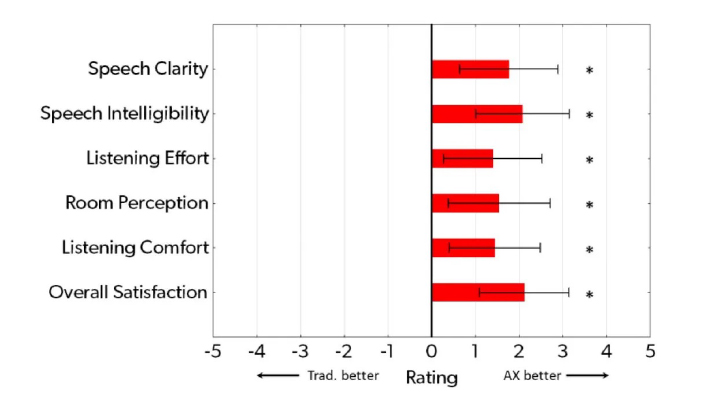
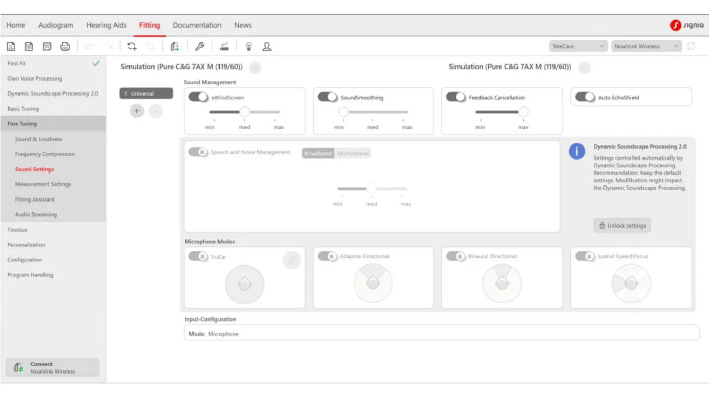
Figure 5: Mean ratings of the differences between Signia AX with Auto EchoShield enabled and conventional processing across six sound attributes under reverberant lobby listening conditions. The error bars represent 95% confidence intervals. The asterisk (*) indicates statistically significant differences (p < .05).

How It Works

As its name suggests, Auto EchoShield is based on the same principles as the existing dedicated EchoShield program. However, unlike a manually selected program with fixed processing settings, Auto EchoShield automatically scans the environment, activates when needed, and continuously adapts its processing according to the level of reverberation detected in the room the user is in.

As a result, Auto EchoShield continuously optimizes sound processing to suit the surrounding acoustic environment, whether the reverberation level is low or high.

Prerequisites

  • Connexx software version 9.7 installed

  • Hearing aid firmware updated, if required

Once the firmware update is complete, the Auto EchoShield feature will be available for hearing aids with performance levels 7 and above.

Activating Auto EchoShield

Auto EchoShield is automatically enabled in the Universal program after the initial fitting (First Fit) for hearing aids with performance level 7AX. You can verify whether this feature is enabled in the Fine Tuning section of the Connexx software under the Sound Settings menu (see Figure 6). It is not recommended to disable this feature.

If desired, you can also create a dedicated Reverberant Room program via the Program Handling menu in the Connexx software.

If you wish to provide the Auto EchoShield feature to customers who are already using Signia AX hearing aids, connect the devices to Connexx and update the firmware if prompted. Once the firmware update is complete, Auto EchoShield will be automatically enabled in the Universal program.

In cases where the user already has an existing Reverberant Room program and wishes to continue using it, it is recommended to delete the old program and create a new one to ensure full access to the updated features.

Figure 6: Auto EchoShield is automatically activated.

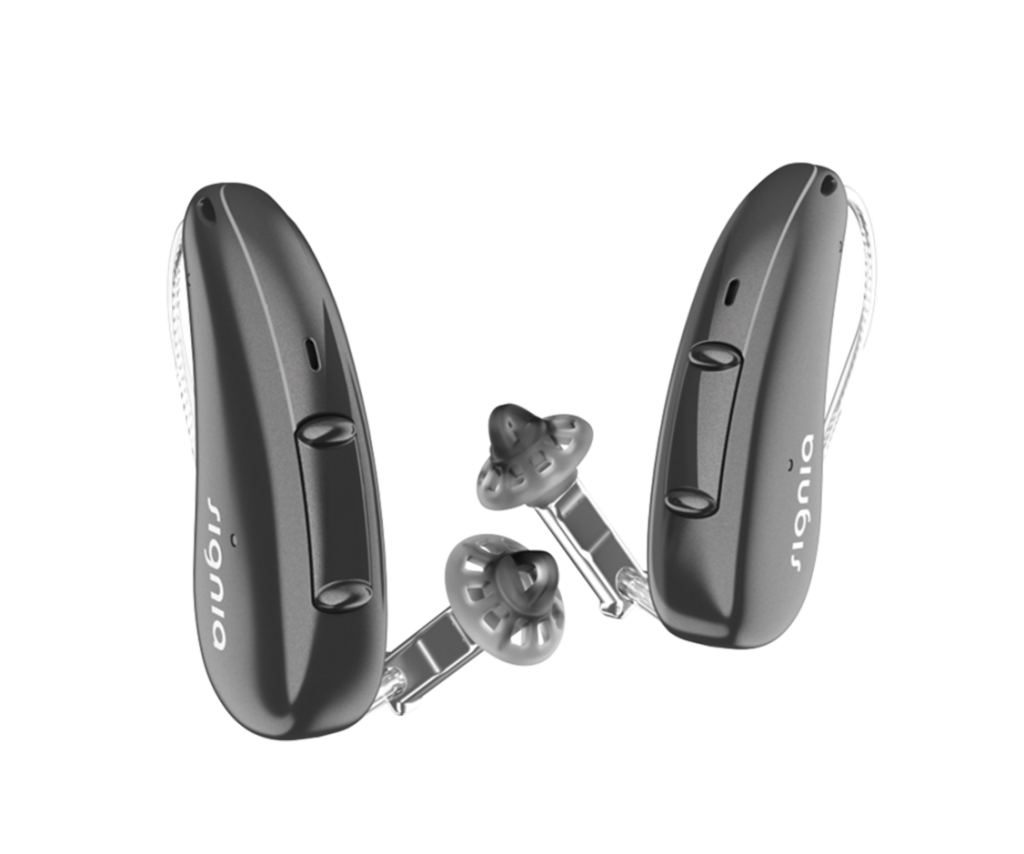
With the advanced, cutting-edge Auto EchoShield technology built into the Signia Pure Charge&Go 7AX, this flagship hearing aid can handle reverberant sound environments like never before, delivering clearer, more comfortable, and more natural listening experiences—no matter where you are.

Signia Pure Charge&Go 7AX

Key Features

  • Dual-processor system that separates speech from ambient sound for clearer speech understanding

  • Own Voice Processing (OVP) to reduce echo and distortion of the wearer’s own voice

  • Motion sensors that adapt sound direction based on activity, such as walking or standing still

  • Rechargeable lithium-ion battery

  • Long battery life of up to 36 hours

  • Bluetooth connectivity for streaming calls, music, or TV audio

  • Compatible with iPhone and Android (ASHA)

  • Works with the Signia App

  • Allows user-controlled sound adjustments via the app

  • Signia Assistant (AI) for automatic sound optimization

  • TeleCare service for online consultation with hearing care professionals

  • Auto EchoShield to reduce room reverberation

  • SpeechFocus & Spatial Configurator for enhanced speech directionality

  • SoundSmoothing and eWindScreen to reduce wind and environmental noise

  • Small, lightweight RIC (Receiver-in-Canal) design

  • IP68-rated for dust and water resistance

Professional Consultation by Hearing Specialists

Call to schedule a service appointment at 02-115-0568

Expert consultation services are provided to help reduce behaviors that risk hearing loss and to ensure proper ear care. Anyone interested in a hearing test or hearing aids can contact **Digibionic**, with services available at all branches.

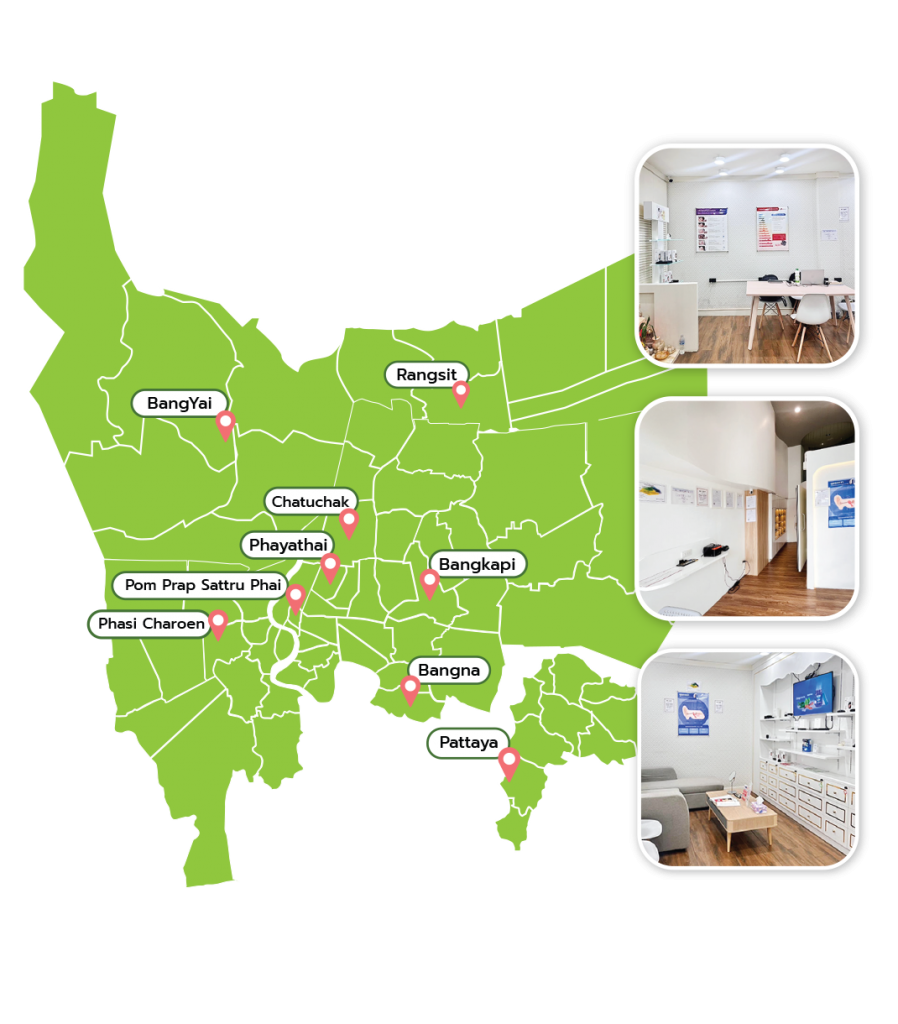
We now have 9 branches open across Bangkok.

Digibionic Thailand

● Chatuchak
● Pom Prap Sattru Phai
● Phaya Thai
● Bang Kapi
● Bang Na
● Phasi Charoen
● Bang Yai
● Rangsit
● Pattaya

Interesting articles.

New Hearing Aid Service Center 2025.

The latest model Hearing Aid Service Center of 2025. The newest hearing aids with excellent quality and service.

STREAMLINE TV: A New Dimension of TV Viewing for Signia Hearing Aids.

If you’re someone who loves watching TV but feels that the sound isn’t clear enough or needs to turn up the volume so loud

Signia Streamline Mic: The advanced microphone that will make your Signia hearing aid hear clearer than ever before.

If you’re someone who wants to hear speech clearly, even when you’re far from the speaker or in a noisy environment

เราใช้คุกกี้เพื่อพัฒนาประสิทธิภาพ และประสบการณ์ที่ดีในการใช้เว็บไซต์ของคุณ คุณสามารถศึกษารายละเอียดได้ที่ นโยบายความเป็นส่วนตัว และสามารถจัดการความเป็นส่วนตัวเองได้ของคุณได้เองโดยคลิกที่ ตั้งค่า

Privacy Preferences

คุณสามารถเลือกการตั้งค่าคุกกี้โดยเปิด/ปิด คุกกี้ในแต่ละประเภทได้ตามความต้องการ ยกเว้น คุกกี้ที่จำเป็น

Allow All
Manage Consent Preferences
  • Always Active

Save