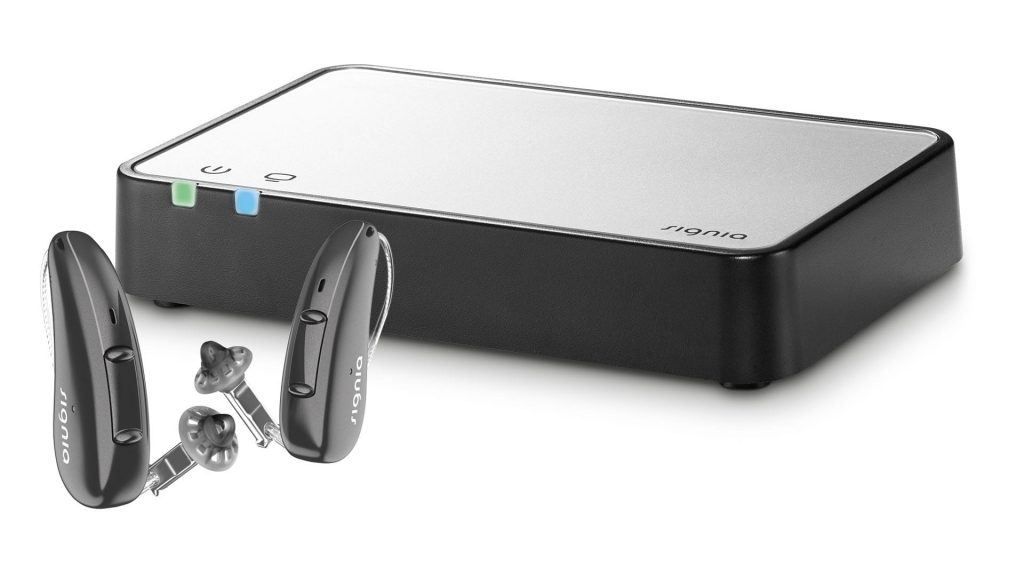
STREAMLINE TV introduces a new dimension of TV viewing for Signia hearing aid users.

If you are someone who loves watching TV but feels that the sound is not clear enough—or you need to turn up the volume so loud that it disturbs others—STREAMLINE TV is the answer. This small device will transform your TV-watching experience because STREAMLINE TV sends the audio signal from your TV directly to your Signia hearing aids, allowing you to hear every sound clearly even when the TV volume is low.

Get to know STREAMLINE TV better and learn the simple steps to use it—making your life easier and more enjoyable.

What is STREAMLINE TV?

STREAMLINE TV is a device designed to help Signia hearing aid users enjoy watching TV to the fullest. It streams sound from the TV directly to your hearing aids, reducing environmental noise and making speech and audio clearer. Whether you’re watching movies, listening to music, or catching up on the news, you can be confident that you won’t miss any important sound or detail.

Why use STREAMLINE TV with Signia hearing aids?

Signia hearing aids are designed to work seamlessly with STREAMLINE TV. With wireless technology, you can connect and use it instantly without complicated setup.

Key features of STREAMLINE TV:

• Clear, realistic sound streamed directly from the TV to your hearing aids
• Reduces background noise, helping you focus on TV audio
• Supports multiple hearing aids at the same time, ideal for families
• Easy to use with no complex settings
• Streams directly up to 10 meters
• Supports Dolby® Digital sound

Connecting STREAMLINE TV to your Signia hearing aids is very simple—just follow the steps in this short video and you can start using it right away.

STREAMLINE TV not only helps you hear the TV more clearly, but also enhances your overall quality of life. It is the perfect solution for Signia hearing aid users who want to enjoy TV to the fullest without disturbing those around them. If you’re ready, start transforming the way you watch TV today! Contact us at a branch near you.

Guidance provided by specialized experts.

Call 02-115-0568 to book an appointment.

Expert consultation services are available to help reduce risky behaviors that may lead to hearing loss and provide guidance on proper ear canal care. If you are interested in a hearing test or hearing aids, feel free to contact Digibionic. We are ready to assist you at all branches.

We now have 9 branches open across Bangkok.

Digibionic Thailand

● Chatuchak
● Pom Prap Sattru Phai
● Phaya Thai
● Bang Kapi
● Bang Na
● Phasi Charoen
● Rangsit
● Bangyai
● Pattaya

FAQ

Currently, StreamLine TV is compatible with Signia AX, Signia Xperience, and Signia Nx hearing aids that have Bluetooth connectivity.

No, you do not need an app to use StreamLine TV. However, you can use the Signia app as a remote control.

Yes, you can pair an unlimited number of Bluetooth hearing aids with your StreamLine TV at the same time, and you can stream to these devices simultaneously as well.

No, you cannot pair your hearing aids with multiple StreamLine TV devices at the same time. If you want to stream from anotStreamLine TV in your home, you will need to pair your hearing aids with that device again (turn off and on your hearing aids – by opening and closing the battery compartment – place your hearing aids on top of the StreamLine TV and wait for the app for 30 seconds).

Interesting articles.

New Hearing Aid Service Center 2025.

The latest model Hearing Aid Service Center of 2025. The newest hearing aids with excellent quality and service.

How to choose Signia hearing aids?

Expensive hearing aids come with many features, but they may not be the right choice for you!

What else should we consider besides the price?

With the continuous development of hearing aid technology, it has led to improved sound quality…

เราใช้คุกกี้เพื่อพัฒนาประสิทธิภาพ และประสบการณ์ที่ดีในการใช้เว็บไซต์ของคุณ คุณสามารถศึกษารายละเอียดได้ที่ นโยบายความเป็นส่วนตัว และสามารถจัดการความเป็นส่วนตัวเองได้ของคุณได้เองโดยคลิกที่ ตั้งค่า

Privacy Preferences

คุณสามารถเลือกการตั้งค่าคุกกี้โดยเปิด/ปิด คุกกี้ในแต่ละประเภทได้ตามความต้องการ ยกเว้น คุกกี้ที่จำเป็น

Allow All
Manage Consent Preferences
  • Always Active

Save